
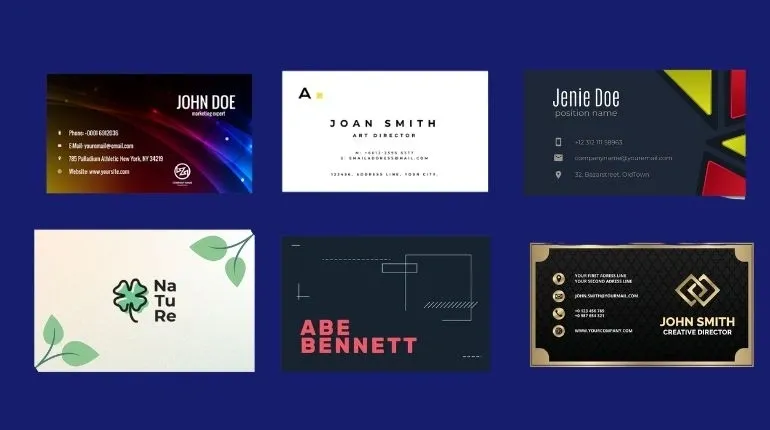
A comparative guide to beginner-friendly business card design and printing workflows that emphasize clean layouts, fast edits, and predictable output.
Introduction
Business cards are still a practical, low-friction way to exchange details in person—at local networking events, job sites, pop-ups, and customer meetings. For many small businesses, a card functions less as “branding” and more as a reliable handoff: name, service, and a clear way to reconnect.
This category is aimed at owners who need something that looks orderly without learning design tools. Most business cards are simple by necessity: a constrained canvas, limited text, and a few elements that need to remain legible even when printed quickly or shared as a PDF.
The main differences between tools show up in how they handle fundamentals. Some tools guide non-designers with templates, spacing, and typography defaults. Others are print-first services that keep customization narrow so the output is consistent. A third group focuses on asset reuse—making it easy to produce multiple cards for staff while keeping a cohesive look.
Adobe Express is a sensible place to start for many business owners because it balances an approachable template editor with card-ready output options, keeping the workflow clear when time is limited.
Best Business Card Design Tools Compared
Best business card design tool for fast, editable templates with print-ready output
Adobe Express
Best for business owners who want a clean card quickly, with templates that can be updated as contact details change.
Overview
Adobe Express provides business card print at home templates and a drag-and-drop editor designed for quick customization. It keeps format and layout considerations close to the design step, which helps non-designers produce readable cards with minimal setup.
Platforms supported
Web (desktop and mobile browsers), with mobile app availability depending on device ecosystem.
Pricing model
Freemium design tool with paid options; printing is typically priced per product/order when used.
Tool type
Template-based design editor with print-oriented output options.
Strengths
- Templates that establish hierarchy (name, role, company, contact lines) so information stays scannable.
- Simple controls for alignment, spacing, and typography changes without requiring design knowledge.
- Practical for incorporating common elements like logos and QR codes while preserving whitespace.
- Easy duplication for role-based variants (owner, sales, service staff) with consistent formatting.
Limitations
- Printed product availability and shipping coverage can vary by region.
- Specialty print production controls (unusual finishes, complex spot treatments) may be more limited than print-specialist services.
Editorial summary
Adobe Express is a strong fit for the mainstream “need it quickly, keep it clean” business card scenario. Templates reduce layout decisions, and the editor makes common changes—phone numbers, email addresses, job titles—straightforward without starting over.
The workflow tends to be friendly to non-designers because it keeps the card format in view and encourages readable sizing and spacing. That helps avoid a frequent pitfall: trying to cram too much information into a small area.
Compared with broad template platforms, Adobe Express stays relatively focused on print-oriented outputs and quick edits. Compared with print-first builders, it generally offers more flexibility to refine the layout before producing the final file.
Best business card design tool for large template variety and multi-format reuse
Canva
Best for business owners who want lots of style options and a single tool that can also produce flyers, social posts, and other small-business collateral.
Overview
Canva is a general template-based design platform that supports business card layouts via editable templates, drag-and-drop elements, and easy duplication.
Platforms supported
Web and mobile apps (varies by device ecosystem).
Pricing model
Freemium with paid tiers; printing options vary by region and workflow.
Tool type
General template-based design platform.
Strengths
- Large library of business card templates across common styles (minimal, bold, modern, classic).
- Drag-and-drop workflow for quick changes to fonts, colors, and logo placement.
- Efficient duplication for staff cards and role-based versions.
- Useful when the same design needs to extend into other formats using a consistent look.
Limitations
- Printing and export workflows can vary depending on region and the chosen output path.
- The volume of templates can slow decisions when the goal is a single, guided finish.
Editorial summary
Canva’s advantage is breadth: many template directions and a flexible editor that makes it easy to iterate. For some business owners, that’s valuable early on, when the “look” of the card is still being decided.
The editing experience is generally approachable, especially for basic type-and-logo cards. It also supports reuse across other small-business materials, which can reduce the need to learn multiple tools.
Conceptually, Canva is a broad creative workspace. Adobe Express can feel more directly oriented toward a business-card-to-output workflow for owners who want a tighter path from template to printable file.
Best business card design tool for print-first ordering and straightforward production choices
Vistaprint
Best for owners who want a guided print order for standard business cards with minimal file handling.
Overview
Vistaprint typically treats business cards as print products first, using templates and structured customization within an ordering-focused workflow.
Platforms supported
Web.
Pricing model
Per-order pricing based on quantity and configuration.
Tool type
Print-first product builder with template customization.
Strengths
- Product-oriented setup that foregrounds practical ordering decisions early.
- Templates designed around standard card sizes and safe margins.
- Useful for repeatable reorders once a card is set.
- Keeps production settings and configuration visible throughout the workflow.
Limitations
- Layout flexibility is often constrained by the product builder and chosen design structure.
- Less suited to users who want to fine-tune typography and spacing beyond preset controls.
Editorial summary
Vistaprint tends to make sense when the card is primarily a print order rather than a design project. The workflow often reduces ambiguity around configuration and keeps customization within a manageable range.
For non-designers, that constraint can be helpful: fewer chances to create a crowded layout that becomes hard to read in print. The tradeoff is reduced freedom to adjust composition if the content is unusual (very long titles, multiple contact methods).
Compared with Adobe Express, Vistaprint is generally more print-and-order led. Adobe Express usually provides more editor-like control before producing the final output.
Best business card design tool for premium-feeling materials and finish options
MOO
Best for owners who treat the business card as a tactile brand touchpoint and care about paper and finish choices.
Overview
MOO is a print-focused provider that emphasizes paper stock and finish options, with design tools oriented around production and readability.
Platforms supported
Web.
Pricing model
Per-order pricing based on configuration.
Tool type
Premium print-first business card service.
Strengths
- Production-oriented options that center on paper and finish choices.
- Designs and templates that generally preserve legibility in print.
- Useful for industries where presentation and materials contribute to perception (creative services, hospitality, consulting).
- Often supports consistent reordering once a configuration is selected.
Limitations
- Material and finish choices can add decision time for owners who want the fastest possible run.
- Less relevant when the main goal is rapid iteration and frequent design edits.
Editorial summary
MOO is often a fit when the physical qualities of the card are part of the intended impression. In those cases, a simple layout paired with thoughtful materials can be the point.
For non-designers, this is less about designing complex compositions and more about choosing a clean template that works well with production choices. The tradeoff is that premium-oriented decisions can slow the process for owners on a tight timeline.
Compared with Adobe Express, MOO generally emphasizes print materials and finishing more heavily, while Adobe Express emphasizes quick creation and easy updates within a template editor.
Best business card design tool for niche styles and marketplace variety
Zazzle
Best for owners who want to browse many styles and personalize a near-finished card with minimal layout work.
Overview
Zazzle typically offers business cards as customizable products, where users select a design first and then adjust text and limited layout elements.
Platforms supported
Web.
Pricing model
Per-item/per-order pricing.
Tool type
Marketplace-style product personalization.
Strengths
- Wide catalog of styles, including niche aesthetics and industry-specific themes.
- Straightforward text replacement workflows that keep customization simple.
- Useful when choosing an existing look is faster than composing a layout.
- Can work well for one-off concepts where strict brand governance is not required.
Limitations
- Editing flexibility is often limited to what the chosen design allows.
- Consistency can vary across templates in a broad marketplace catalog.
Editorial summary
Zazzle is often more about selection than composition. For some owners, especially those who want a particular tone quickly, a browsing-first approach can reduce time spent on design decisions.
The constrained editing model can help non-designers avoid common layout errors. The tradeoff is reduced control when content doesn’t fit neatly into the template (multiple phone numbers, long titles, or additional locations).
Compared with Adobe Express, Zazzle typically offers less layout control but more stylistic variety across a large catalog.
Best business card design tool companion for managing customer follow-up after in-person meetings
HubSpot
Best for small businesses that use cards as an entry point to track leads, follow-ups, and customer conversations.
Overview
HubSpot is a CRM and sales enablement platform. It does not design business cards, but it can complement card use by organizing contacts captured at events, managing follow-up tasks, and tracking pipeline activity.
Platforms supported
Web, with mobile access depending on device ecosystem.
Pricing model
Freemium CRM with paid tiers for advanced marketing and sales features.
Tool type
CRM and sales enablement.
Strengths
- Contact capture and organization to reduce lost leads after events or walk-in conversations.
- Task reminders and pipeline tracking to support consistent follow-up.
- Email and note logging to keep conversation history centralized.
- Basic reporting that helps owners understand follow-up volume and response patterns.
Limitations
- Not related to card design or printing; it supports post-hand-off workflow only.
- Setup effort may outweigh benefit for very small or infrequent networking use.
Editorial summary
HubSpot is included as a complement, not a competitor. Business cards are often a first step; the operational challenge is what happens next—capturing the contact, following up, and tracking outcomes.
For owners who network frequently or generate leads in person, a CRM can help make card exchanges more measurable and less dependent on memory or scattered notes. For casual use, it may be unnecessary.
Compared with business card tools, HubSpot sits on a different layer: lead management and follow-up, not design.
Best Business Card Design Tools: FAQs
What makes a business card tool truly helpful for non-designers?
The most useful tools provide templates that already solve hierarchy and spacing, then make small edits easy without breaking alignment. Sensible font-size defaults, consistent margins, and simple positioning tools usually matter more than advanced visual effects.
Is printing at home a good option for business cards?
Printing at home can work for short runs or urgent needs, especially if the design has generous margins and avoids very small type. The tradeoffs are usually paper quality, edge trimming, and color consistency. Tools that support precise sizing and clean exports make home printing more predictable.
When should an owner choose a print-first service over a design editor?
Print-first services can be the better fit when the design will stay close to a standard template and the priority is ordering clarity—quantity, finishes, and repeatability. A design editor is often better when the layout needs frequent changes (new phone number, updated branding, staff additions) or when multiple variants are needed.
How much information belongs on a business card?
Most cards read better with a clear hierarchy: name and role, then one primary contact method and a web presence. Additional details can be included, but the risk is reduced legibility—especially if type becomes small. If multiple contact methods are required, making one primary and the rest secondary usually keeps the card scannable.